

Switching between a standard 40mm-tall mechanical board and a slim laptop keyboard usually means enduring a painful adaptation window .
Standard high-profile mechanical keyboards offer deep, satisfying 4 .0mm travel, but they almost mandate a padded wrist rest to prevent strain during eight-hour workdays .
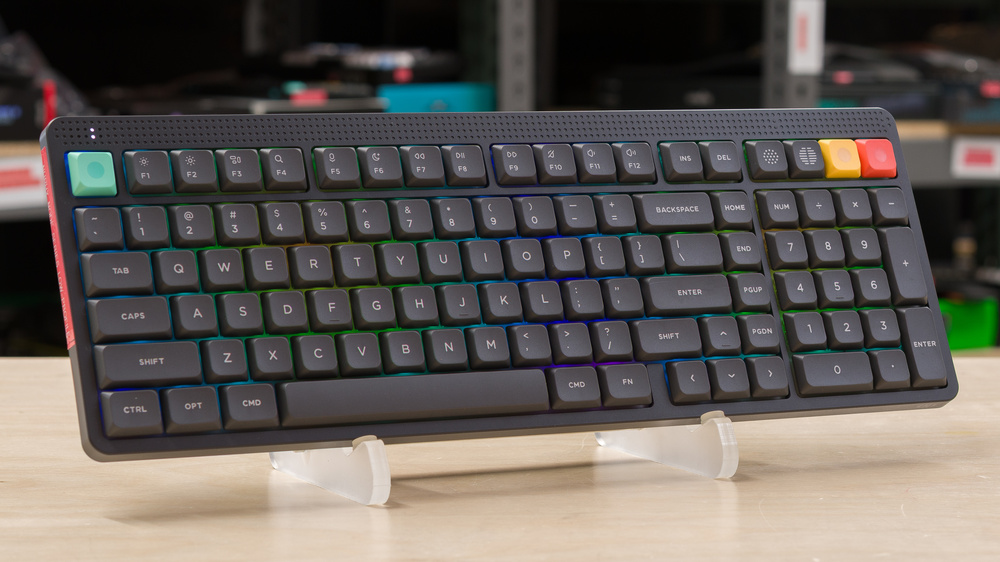
The NuPhy Node Series attacks this tension by offering two foundational paths: low-profile and high-profile architecture .
In practical daily use, the low-profile Node sits remarkably close to the desk surface .
Your hands rest in a neutral, relaxed posture reminiscent of an Apple Magic Keyboard, yet you retain the distinct click or bump of genuine mechanical switches .
If you spend your days churning out prose, code, or dense spreadsheets at 75+ WPM, the reduced finger travel on the low-profile edition lowers physical fatigue over long stretches .
However , traditional mechanical enthusiasts who savor bottoming out on full-height keys will prefer the high-profile version, which retains that deeper, classic acoustic resonance .
The Ergonomic Trade- off : Low-Profile vs .
High-Profile Switching between a standard 40mm-tall mechanical board and a slim laptop keyboard usually means enduring a painful adaptation window .
Standard high-profile mechanical keyboards offer deep, satisfying 4 .
0mm travel, but they almost mandate a padded wrist rest to prevent strain during eight-hour workdays .
The NuPhy Node Series attacks this tension by offering two foundational paths: low-profile and high-profile architecture .
In practical daily use, the low-profile Node sits remarkably close to the desk surface .
Your hands rest in a neutral, relaxed posture reminiscent of an Apple Magic Keyboard, yet you retain the distinct click or bump of genuine mechanical switches .
If you spend your days churning out prose, code, or dense spreadsheets at 75+ WPM, the reduced finger travel on the low-profile edition lowers physical fatigue over long stretches .
However , traditional mechanical enthusiasts who savor bottoming out on full-height keys will prefer the high-profile version, which retains that deeper, classic acoustic resonance .
Typing Feel and Acoustic Character NuPhy has earned a solid reputation among mechanical keyboard enthusiasts for factory tuning, and the Node Series follows through with clean acoustic isolation .
Low-profile mechanical keyboards frequently suffer from hollow, pingy chassis noise because thin enclosures leave little space for dampening foam .
The Node Series counters this with well-compressed internal damping that keeps typing clacks tight and localized .
Actuation on the low-profile switches feels instantaneous .
Because travel depth is shaved down compared to full-size switches, keys register with minimal finger effort .
Here is the unexpected observation: if you are heavy -handed and tend to hammer down aggressively on keys, you will feel the deck stop your fingers quicker than on a standard board .
It takes roughly two days of recalibration to develop a lighter, faster cadence .
Once you adjust, typing speed tends to climb because your fingers do not have to clear tall keycap ridges between strokes .
Wireless Connectivity and Desk Management Cables are the enemy of a minimalist workstation .
The Node Series addresses wireless flexibility through a tri-mode approach: 2 .
4GHz low-latency wireless via a dedicated USB dongle, multi-device Bluetooth for phones and tablets, and a standard wired USB-C mode for charging while in use .
In testing wireless stability across multiple devices, switching back and forth between a Mac desktop and a Windows work laptop is straightforward via onboard key combinations .
For everyday productivity, Bluetooth latency remains completely unnoticeable .
If you run casual gaming sessions after work, slotting in the 2 .
4GHz wireless dongle gives you the responsiveness and jitter-free polling needed to keep inputs sharp .
One practical detail to watch: keeping backlighting active continuously will accelerate your recharge cycles, so keeping brightness around 30% or disabling it during daylight hours is the smartest approach for maximizing unplugged uptime .
Build Construction and Long-Term Durability Despite its slender chassis in the low-profile edition, the Node Series exhibits minimal flex when applying moderate downward pressure in the center .
The materials feel dense, textured, and resistant to oil buildup .
The keycaps feature high-durability legends designed not to fade or develop shiny patches quickly under constant friction .
One structural caveat buyers should keep in mind centers on customizability .
If you purchase the high-profile Node variant, aftermarket keycap sets using standard MX-stem layouts are widely available everywhere .
If you opt for the low-profile version, stem offsets and low-profile switch designs restrict your custom keycap choices to proprietary or purpose-built low-profile sets .
Make sure you are content with the stock aesthetic out of the box before choosing the slim design .
Wizard: PROS | CONS Wizard: FREQUENTLY ASKED QUESTIONS

